Меню
In order to ensure the operation of the Electronic Invoices information system (hereinafter referred to as the ESF IC) and the Virtual Warehouse module through the API mechanism, a developer kit (SDK- software development kit) and API documentation are available for you, which define the methods, rules and procedure for information interaction of taxpayer accounting systems with the ESF IC, the Virtual Warehouse module, including working with the SNT.
The developer's package includes:
- API documentation (SNT, ASF, IAD, ED, reference books, SNT and TNF-328 comparison forms, SNT notices)
- ESF templates in XML format
- ESF project for SOAP
- Signature generation application
- Library Files
In order to understand how the API mechanism works, follow these steps:
Step 1:
Download the developer kit (ESF SDK documentation, SUN SDK documentation, MACOSX )
Step 2:
There is an application in the local server folder that will allow you to generate a signature. You need to run it from the console as an Administrator by calling the start.bat file
Step 3:
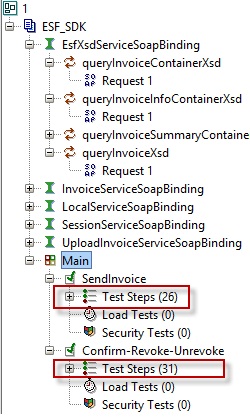
The soapui package contains an XML file containing an ESF project. The project needs to be opened in SoapUI which can be downloaded on the official website. After opening the project, you will find links to the description of methods and services.
It also provides two test scenarios for the sequential execution of all operations.
Step 4:
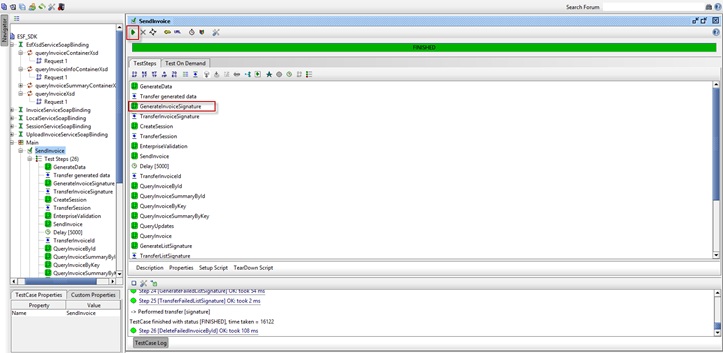
Run the script, wait for its completion.
In the window you will be able to see each step of the execution of each request. When you double-click on the request, you will be able to see the request body itself and the response that came from the system.
The results of the script execution can be seen on the test stand of the ESF IS.
You can enter the test stand using your own certificates.
A detailed description of the services and methods can be found in the documentation, in the SOAP project or by following the link