How to get an EDS and register on the portal
Dear user! If you have visited eGov.kz portal for the first time and want to start receiving online services and use the Personal account, then follow these step-by-step:
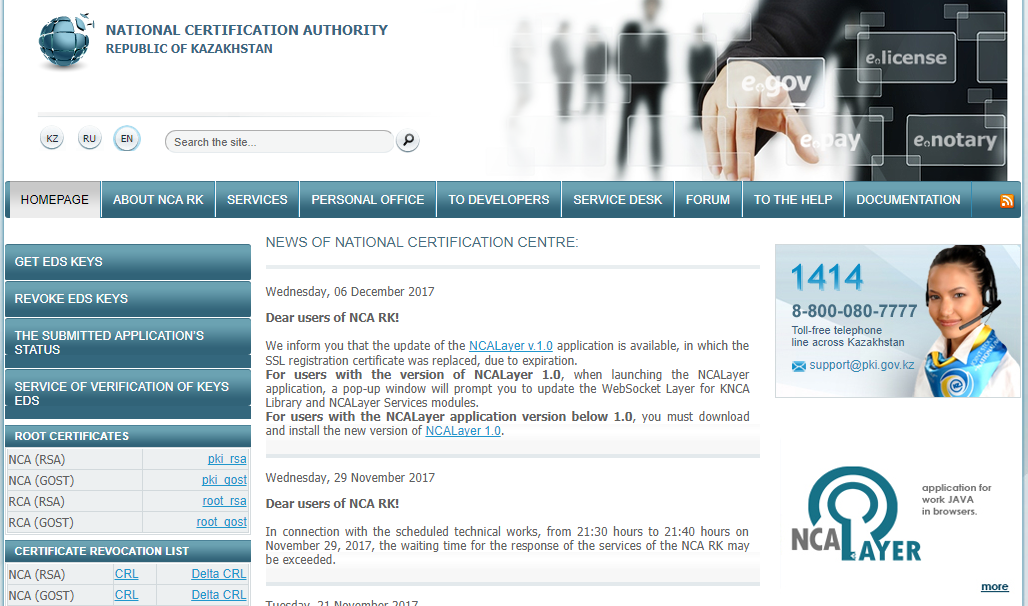
1. Install the Java and NCALayer software and root certificates of the NSC RK on your computer.
- Java software can be downloaded from the official Java.com website.
- NCALayer software is downloaded from the official site of the NSC RK . The installation process is intuitive, but if you have difficulties, you can use the instruction (PDF).
Root certificates are also on the home page of the site of the NSC RK.
2. Obtain an EDS keys necessary for registration and authorization on the portal, as well as for online services.
EDS (electronic digital signature) is an analogue of a handwritten signature used to give an electronic document the same legal force as if it were on paper with a signature and a sealed seal.
- The application for EDS can be submitted online through a special section of the site of the NSC RK. The application is recommended to be submitted from a personal computer for security purposes.
- Submission of an online application from an individual . Instructions on this link ;
- Submission of an online application from a legal entity ;
- After submitting an online application, you need to visit the PSC to confirm it. You need to have an ID Card and a printed application. After the verification, the operator will make a confirmation and you will be able to download the EDS to the computer and set your password on it.
What is the difference between EDS keys with the name AUTH_RSA from RSA?
RSA is designed to sign an electronic document / request, and AUTH_RSA is for user authentication, i.e. for login/authorization.
Note that the validity period of the EDS is 1 year, but users have the opportunity to extend it for one year, provided that the term of the current digital signature has not yet expired. Instructions for renewal – for individuals, for legal entities .
EDS can be stored on various media, but it should be with great responsibility to ensure that it does not fall into the wrong hands.
3. Register on the portal with EDS. The registration procedure is intuitive, but if you have any questions, we recommend using the instruction (PDF).
- Go to the registration page , read the user agreement and click on the "Register with EDS" button;
- Create a password and enter your personal e-mail. The password must contain a combination of alphanumeric and alphabetic characters in upper and lower case (at least 8 characters, but not more than 30 characters);
- Select your digital signature (RSA) and confirm the registration.
After registration and in the presence of EDS you will be able to open all the possibilities of the eGov.kz portal. At your disposal will be a lot of electronic public services and services, as well as access to the Personal account, which will help monitor personal data stored in government information systems.
In addition, the EDS gives the opportunity to authorize on the portals of the Open Government and to register on the electronic licensing portal Elicense.kz .
EDS validity period – 1 year applies only to the file system. If the EDS keys are written to protected media (ID card, Kaztoken, Etoken, Akey, JaCarta), the validity period will be 3 years.